Wednesday, February 22, 2012
Banner

MSI Raptor

Article Index
MSI Raptor
Packaging
Exterior
Interior
Performance
Overall
All Pages

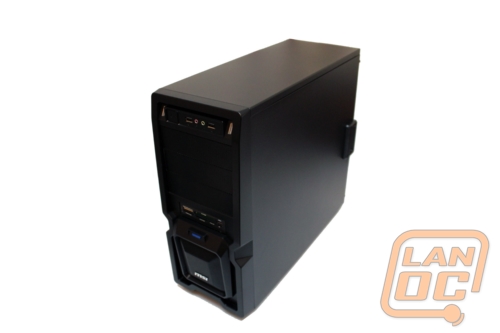
titleWhen looking at cases for your next build, there are several ways that you can go.  On the high end, you have a plethora of options and can spend hundreds of dollars on one.  Then, there is the middle-of-the-road good quality case.  For a budget build, there are is also a litany of options.  When looking at a budget case there are some sacrifices that you make for the sake of price.  Today we are looking at the MSI Raptor case, a budget case with some interesting options.  Does this case’s unique options make up for the shortcomings of being a budget case, or is this another case you should skip even on a budget build?  Let’s put it through its paces and find out.

Product Name: MSI Raptor

Review Sample Provided by: MSI

Review by: Wes. Chad, Adam

Pictures by: Wes


Specifications

Interceptor

Raptor

Model

IN-9410

Form Factor

ATX Mid Tower

Color / Type

Black (Steel)

Front Bezel Material

Mesh

Motherboard Support

ATX / MicroATX

5.25" Drive

3

3.5" Internal

6

Expansion Slots

7

USB 2.0 / 3.0

2 / 1 (Front Panel)

HD/97 Audio

Yes (Front Panel)

Card Reader

Yes

Included Fans

2 (120mm Front, Back)

Optional Fans

Up to THREE (3) addtl. 120mm fans

Dimensions (Chassis)

180(W) x 428(L) x 410(H) MM

Warranty

3 Years


Posted: 3 weeks, 6 days ago by garfi3ld #22336
A case from MSI? Take a look!
Posted: 3 weeks, 6 days ago by Wingless92 #22338
How about, no wire management. While it is a cheap case, it doesn't cost extra to cut holes in the motherboard tray. It would have been nice to see this included.

Loving the installed card readers along with the USB3 header. Not sure about the blue but it does stick with the MSI theme.

No fan filters either but again, cheap price, not gonna get many options. Atleast you can buy filters if you ever wanted to go down that road later. Then again, my case didn't come with filters and that was way more than this, lol.

Seems like a stout entry level case. Good to see MSI doing something different.
Posted: 3 weeks, 6 days ago by Lersar #22339
Wingless92 wrote:
doesn't cost extra to cut holes in the motherboard tray.

I've got a few mods going right now that need some holes cut, want to come over and do it for free for me?
Posted: 3 weeks, 5 days ago by Wingless92 #22350
Sure, make it your wedding gift?
Posted: 3 weeks, 5 days ago by Lersar #22357
Done, but you can't make them in the shape of mudflap girls. This will have to go in the same room as my soon-to-be wife.
Posted: 3 weeks, 5 days ago by garfi3ld #22360
BTW take a good look at the space between the motherboard tray and the side panel. There just isn't any space for wiring, holes wouldn't be useful. Size wise its just to small to fit in wire management of that style. Its noticeably smaller than the "normal" mid tower for most people.
Posted: 3 weeks, 5 days ago by Wingless92 #22364
Lersar wrote:
Done, but you can't make them in the shape of mudflap girls. This will have to go in the same room as my soon-to-be wife.


How about

Posted: 3 weeks, 5 days ago by garfi3ld #22365
how did you guys get a cutout of me?

Discuss this article
You need to log in or register to participate in this discussion.

 Be sure to add/follow us on your favorite social networks

facebook80Image_1_2Image_1Steam_Logopoj  playfire_logo

We have 346 guests and 7 members online
  • Lersar
  • draymac
  • Dreyvas
  • jonnieolmo
  • coldcalculation
  • jj_Sky5000
  • garfi3ld

mylansite Event Status

LanOC v10.0 Status
119 Participants
101 Have paid
0 Are pending
18 Places available

Twitter


LanOC_Reviews
LanOC_Reviews HD 7770 Crossfire Results goo.gl/fb/f8Anh

21 hours ago via Google

LanOC_Reviews
LanOC_Reviews I play LoL; What should I know about Dota 2? goo.gl/fb/HMgPP

2 days ago via Google

LanOC_Reviews
LanOC_Reviews XFX R7770 Black Edition Double D goo.gl/fb/AgXE8

1 week ago via Google