|
CPU
|
Supports Intel® Turbo Boost Technology 2.0
Support Intel® 32nm CPU
* The Intel® Turbo Boost Technology 2.0 support depends on the CPU types.
* Refer to www.asus.com for Intel CPU support list
|
|
Chipset
|
Intel® P67 Express Chipset
|
|
Memory
|
* The Max. 32GB memory capacity can be supported with DIMMs of 8GB (or above). ASUS will update QVL once the DIMMs are available on the market.
* Hyper DIMM support is subject to the physical characteristics of individual CPUs. Some hyper DIMMs only support one DIMM per channel. Please refer to Memory QVL for details.
* Due to CPU behavior, DDR3 2200/2000/1800 MHz memory module will run at DDR3 2133/1866/1600 MHz frequency as default.
4 x DIMM, Max. 32 GB, DDR3 1866(O.C.)/2133(O.C.)/2200(O.C.)*/1600/1333/1066 Non-ECC,Un-buffered Memory
Dual Channel memory architecture
Please refer to www.asus.com or user manual for Memory QVL.
Supports Intel® Extreme Memory Profile (XMP)
|
|
Expansion Slots
|
(single at x16 or dual at x8/x8 mode)
x PCIe 2.0 x16 2 1 x PCIe 2.0 x16 * [Black] (max. at x4 mode, compatible with PCIe x1 and x4 devices)
2 x PCIe 2.0 x 1
2 x PCI
*The PCIe x16_3 slot shares bandwidth with the PCIe x1_1 slot, PCIe x1_2 slot, ESATA3G & PESATA3G and USB3_34. The PCIe x16_3 runs at x1 mode by default for system resource optimization. (PCIe x1_2 will be disabled.)
|
|
Multi-GPU Support
|
Supports NVIDIA® Quad-GPU SLI™ Technology
Supports ATI® Quad-GPU CrossFireX™ Technology
|
|
Storage
|
Intel® P67 Express Chipset
2 xSATA 6.0 Gb/s ports
(gray)
4 xSATA 3.0 Gb/s ports (blue)
Intel® Rapid Storage Technology Support RAID 0,1,5,10
Marvell® 9120 controller
2 xSATA 6.0 Gb/s ports (navy blue)*
JMicron® JMB362 SATA controller
2 xExternal SATA 3.0 Gb/s ports*
* These SATA ports are for data hard drives only. ATAPI devices are not supported.
|
|
LAN
|
Dual Gigabit LAN controllers- 802.3az Energy Efficient Ethernet (EEE) appliance
Intel® 82579 Gigabit LAN- Dual interconnect between the Integrated LAN controller and Physical Layer (PHY)
Realtek® 8110SC Gigabit LAN
|
|
Bluetooth
|
Bluetooth v2.1 + EDR
ASUS BT GO! Utility
|
|
Audio
|
Realtek® ALC892 8-Channel High Definition Audio CODEC
- Absolute Pitch 192khz/24bit True BD Lossless Sound
- BD Audio Layer Content Protection
- DTS Surround Sensation UltraPC
- Supports Jack-Detection, Multi-streaming, Front Panel Jack-Retasking
- Coaxial / Optical S/PDIF out ports at back I/O
|
|
IEEE 1394
|
VIA® 6308P controller supports 2 x 1394a ports (one at mid-board; one at back panel)
|
|
USB
|
NEC USB 3.0 controllers
- x USB 3.0/2.0 ports (2 at mid-board for front panel support, 2 at back panel (blue))
4 Intel® P67 Express Chipset
- x USB 2.0/1.1 ports (6 ports at mid-board, 6 ports at back panel)
12
|
|
ASUS Unique Features
|
ASUS Dual Intelligent Processors 2 with DIGI+ VRM:
ASUS EPU
- EPU, EPU switch
ASUS TPU
- Auto Tuning, TurboV, TPU switch
ASUS Digital Power Design
- Industry leading Digital 12+2 Phase Power Design
- ASUS DIGI+ VRM Utility
ASUS BT GO! (Bluetooth)
- Folder Sync, BT Transfer, Shot & Send, BT to Net, Music Player, Personal Manager, BT Turbo Remote
ASUS Exclusive Features
- MemOK!
- AI Suite II
- AI Charger
- Anti Surge
- ASUS EFI BIOS EZ Mode featuring friendly graphics user interface
ASUS Quiet Thermal Solution
- ASUS Fanless Design: Heat-pipe solution
- ASUS Fan Xpert
ASUS EZ DIY
- ASUS Q-Shield
- ASUS Q-Connector
- ASUS O.C. Tuner
- ASUS CrashFree BIOS 3
- ASUS EZ Flash 2
ASUS Q-Design
- ASUS Q-LED (CPU, DRAM, VGA, Boot Device LED)
- ASUS Q-Slot
- ASUS Q-DIMM
|
|
Overclocking Features
|
Precision Tweaker 2
- vCore: Adjustable CPU voltage at 0.005V increment
- vCCIO: Adjustable I/O voltage at 0.00625V increment
- vCCSA: 144-step system agent voltage control
- vDRAM Bus: 160-step Memory voltage control
- vPCH: 90-step Chipset voltage control
- vCPU_PLL: 160-step CPU & PCH PLL voltage control
SFS (Stepless Frequency Selection)
- BCLK/PEG frequency tuning from 80MHz up to 300MHz at 0.1MHz increment
Overclocking Protection
- ASUS C.P.R.(CPU Parameter Recall)
|
|
Back Panel I/O Ports
|
2 x USB 3.0/2.0 (blue)
1 (purple)
x PS/2 Keyboard 1 (green)
x PS/2 Mouse 2 (1 x Power eSATA)
x External SATA 2 x S/PDIF Out (1 for Coaxial, 1 for Optical)
1 x IEEE 1394a
2 (1 x Intel® LAN)
x LAN(RJ45) port 6
x USB 2.0/1.1 8 -Channel Audio I/O
1 x Clr CMOS switch
|
|
Internal I/O Connectors
|
4 x SATA 6.0Gb/s connectors (2 x gray; 2 x navy blue)
1 x Mem OK! Button
8-pin EATX 12V Power connector
1 x TPU switch
1 x EPU switch
1 x Power-on switch
1 x Reset switch
1 x USB 3.0/2.0 connector(s) supports additional 2 USB ports (19-pin)
3 x USB 2.0/1.1 connector(s) support additional 6 USB ports
1 x System Panel (Q-Connector)
1 x IEEE 1394a connector
1 (4-pin)
x CPU Fan connector 2 (1 x 4-pin; 1 x 3-pin)
x Chassis Fan connector (1 x 3-pin)
1 x Power Fan connector 1 x S/PDIF Out connector
24-pin EATX Power connector
Front panel audio connector
|
|
BIOS
|
32 Mb Flash ROM , EFI AMI BIOS, PnP, DMI2.0, WfM2.0, SM BIOS 2.5, ACPI 2.0a, Multi-language BIOS, ASUS EZ Flash 2, ASUS CrashFree BIOS 3
|
|
Manageability
|
WfM 2.0,DMI 2.0,WOL by PME,WOR by PME,PXE
|
|
Accessories
|
2 x SATA 3.0Gb/s cables
2 x SATA 6.0Gb/s cables
1 x Q-Shield
User's manual
2 in 1 Q-connector
1 x ASUS USB 3.0 Bracket
1 x ASUS SLI bridge connector
|
|
Support Disc
|
ASUS Utilities
Drivers
Anti-virus software (OEM version)
ASUS Update
|
|
Form Factor
|
ATX Form Factor
12 inch x 9.6 inch ( 30.5 cm x 24.4 cm )
|


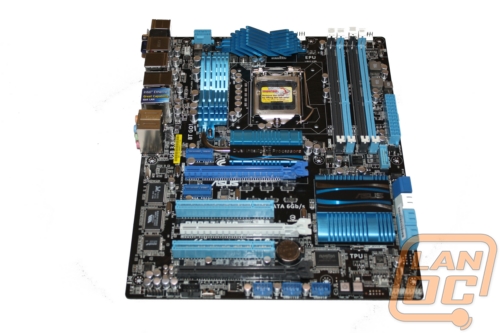 Being a car guy when I first saw the P8P67 EVO from Asus I couldn’t help connect the EVO name with a Mitsubishi Evo. I can’t imagine that Asus would somehow manage to get the boxy styling and sharp lines of the Lancer Evo, but maybe it has the raw power that the Evo is known for. Either way, I know that by the end of this review I will be drifting sideways in DIRT 2 ether way. Before that I will go over ASUS’s standard P67 product lineup and the P8P67 EVO’s feature set. While we are in there we will also test its performance and take a close look at the include software.